A Step by Step Guide to Building Your First Mobile App
Author
Abhishek Dixit
  • 18-12-2023
  • 9 min read

In the digital era, mobile applications have become an essential part of our daily lives. From entertainment to productivity to social interaction, mobile applications provide a wide range of opportunities. If you have ever considered developing an app but have no idea where to begin, this guide will provide you with the necessary information to create your first mobile application. From concept to deployment, this guide will cover all the necessary steps to bring your app idea to life.


Step 1: Describe your App Idea: 

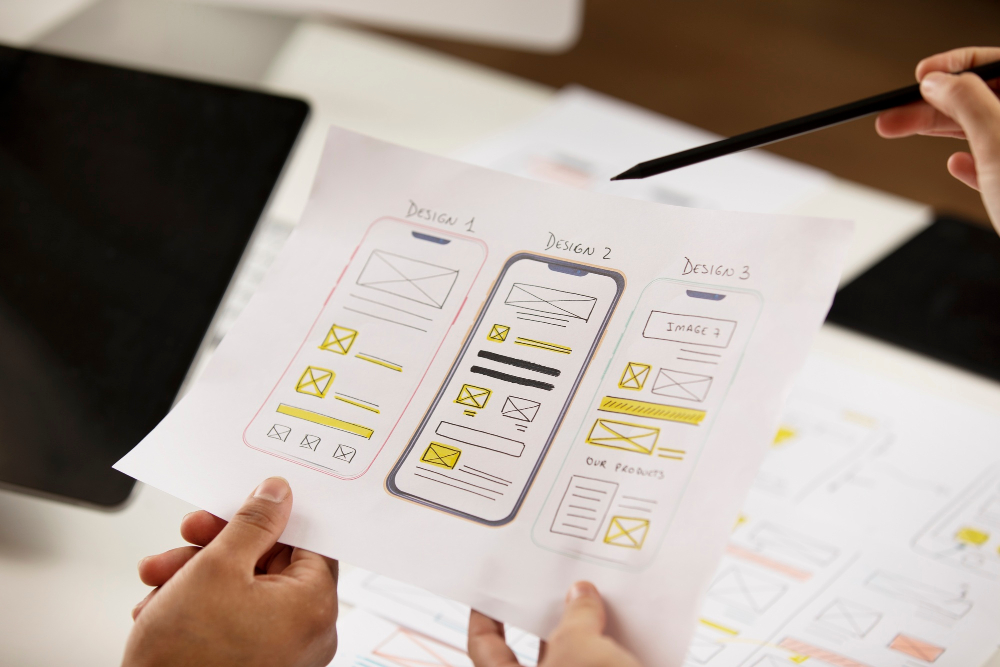
The first step in creating a mobile app is to define your idea. Start by identifying the problem or need that your app will address. Conduct market research to understand your target audience and competitors. This will cleanse your idea and make it unique. Think about the features and functions you want to add to your app and draw a solid sketch or wireframe to visualize its layout. 


Step 2: Design Your App: 

Once you have a clear idea of ​​what your app will do, it is time to plan its development. Develop a detailed project plan that describes the application features, user interface, and user experience. Determine which platforms you want to target (iOS, Android, or both) and choose the right development tools and technologies. Divide the development process into smaller projects and establish a realistic timeline for each stage.


Step 3: Create a user profile: 

The user interface (UI) is the most important part of any mobile application. It shows how users interact with your app and plays a key role in its success. Start by creating wireframes and mockups to visualize the layout and flow of the application. Use design tools like Sketch or Figma to create realistic UI layouts. Pay close attention to colour schemes, text, and graphics for aesthetically pleasing and visual communication. 


Step 4: Create your App: 

Then comes the technical part – app development. If you have coding experience, you can build the app yourself. Alternatively, you can hire a professional app developer or use low-code or no-code platforms to simplify the development process. Choose a programming language (like Swift for iOS or Java for Android) and start coding the app’s functionality. Test your app regularly to find and fix any bugs or issues.


Step 5: Test and fix: 

Testing is key in app development. Test carefully to make sure that your app works as designed and provides an easy user experience. Test compatibility on different devices, screen sizes, and operating systems. Collect feedback from beta testers and make necessary improvements based on their suggestions. Continue to improve your app to improve its functionality, performance, and everything else. 


Step 6: Deploy and Market Your App: 

Once your app is well-tested and optimized, its time to take it to the app stores. Register as a developer on the Apple App Store and Google Play Store, and follow their guidelines for submission. Prepare compelling app descriptions, screenshots, and promotions to attract users. Use effective App Store Optimization (ASO) techniques to improve your apps visibility and visibility. Use social media, online advertising, and other marketing strategies to generate awareness and downloads.


Conclusion:

Creating a mobile app in the beginning can seem like a daunting task, but if you follow this step-by-step guide you can go down the road with confidence. Remember to start with a clear application concept, plan well, design user-friendly, optimize, test rigorously, and sell well. Creating a successful mobile app requires dedication, patience and continuous improvement. Embrace challenges, learn from your mistakes and innovate. With determination and the right approach, you can turn your app idea into reality and make a meaningful impact in the digital world.


 

Corewave Media

alkauser final
alkauser final
India Shorts Logo
business up turn logo
business news this week logo
india global live logo
india npress wire logo
briefbuzz logo
insight ful news logo
india times online logo
the india watch logo
village voice news logo
Karnataka News Network logo
delhi news daily logo
gossip today 24 logo
Standard Today News logo
india buzz news logo
andhra news digest logo
latest news today logo
india latest news logo
latest news himachal logo
india live news feed logo
india npresscoverage logo
india tribune times logo
India Breaking Buzz logo
Newz Today 24 logo
News India Connectivity Logo
District Daily News logo
media sminds logo
news indian bulletin logo
odisha news hour logo
india brief update logo
india press dispatch logo
uttara khand news wire logo
goanewstime logo
indiabulletinnews logo
indiatodaytimes logo
indiawirenews logo
newsindias logo
indianpulsemedia logo
indiamirrornews logo
indiabulletinlive logo
maharastraportal logo
dailystreetjournal logo
reachnews logo
indiabuzzfeednews logo
gujaratwatch logo
indianheadlinebuzz logo
jharkhandindianewsagency logo
rajasthanheadlines logo
indialatestnewsfeed logo
indiaflashbulletin logo
expresstimesnews logo
theindianpost logo
indiannewsdailyupdate logo
thequickupdate logo
newsindianetwork logo
thehindustanexpress logo
chronicletodaynews logo
indiapulseupdate logo
indiapresscoverage logo
indiainformer logo
newsindiaweb logo
newstoday99 logo
karnatakanewsroom logo
insiderindiatimes logo
indiaflashnews logo
indiabriefings logo
dailygossiponline logo
newswaveindia logo
indianewsjunction logo
indiandailypress logo
indiacurrentaffairs logo
thenewsnet logo
discoverweekly logo
tripuranewscentral logo
reporttoday logo
stroyindia logo
indiatodayupdates logo
indianewsbreak logo
indiannewschannel logo
timesofindiadaily
dailyindiaupdates logo
indiacurrentupdate logo
indianewsconnect logo
dailynewsindiaonline logo
madhyapradeshnewstribune logo
newsindialive logo
indialivenews logo
odishanewsvoice logo
nagalandnewswatch logo
reportnews logo
newsindiapoint logo
telangananewsspot logo
indianewsnation logo
theindiatalks logo
indiaflashnewsfeed logo
indiareporterlive logo
punjabnewsnetwork logo
newsindiatimes logo
indiapressbuzz logo
indiatimesnews logo
newsindia24x7 logo
nagalandnews24x7 logo
newsindianupdate logo
biharnewswatch logo
indiawirechannel logo
himachalpradeshnewsflash logo
tripuranewspoint logo
panjabnewsupdate logo
indiapostdaily logo
tamilnadunewsupdate logo
mizoramnewspulse logo
maharashtranewsflash logo
indiatodaydaily logo
himachalnewsreport logo
dailyindiane logo
india24x7news logo
rabale logo
mizoramnewsvoice logo
indiaglobetoday logo
indianewsportal logo
indiawatchdaily logo
indiatodayliveupdate logo
newsindianline logo
indianheadlinenews logo
goanewsonline logo
indiannewsviews logo
indiannewsupdate logo
newstodaypro logo
latestnewskarnataka logo
indiainformedia logo
thenewsindianow logo
indianexpressnewsfeed logo
jammuandkashmirnewsreport logo
indiannewsbeat logo
indiawatchlive logo
newsindiaheadline logo
rajasthannewstime logo
indialivenewstoday logo
jharkhandnewshub logo
indianpressconnect logo
theindiabrief logo
indianexpressnews logo
indiaworldnews logo
chhattisgarhnewsline logo
newsindianlink logo
indiabuzzchannel logo
newspulseindia logo
hoist logo
newseagleindia logo
indialatestnewsupdate logo
indiapressjournal logo
newsindiatalks logo
indiavibesmedia logo
theindiatimesonline logo
indiatodayheadlines logo
indianexpressdaily logo
indialivenewsupdate logo
indianexpressupdate logo
indiawiremedia logo
haryananewsline logo
indiatodaynewsflash logo
newsmirror logo
indiaglobalnews logo
manipurnewsworld logo
newswires logo
theindianpostonline logo
indiaforbesnews logo
mynewstoday24 logo
indiastatenews logo
indianfocusnews logo
indiastoryline logo
statenewstoday logo
newsindianpulse logo
sikkimnewsupdate logo
Contact Information

C - 273, Sector 63, Noida, Uttar Pradesh 201301

We're Available 24/7. Call Now. +91 98106 76072 +91 99997 30515 corporate@corewave.io
Find us here